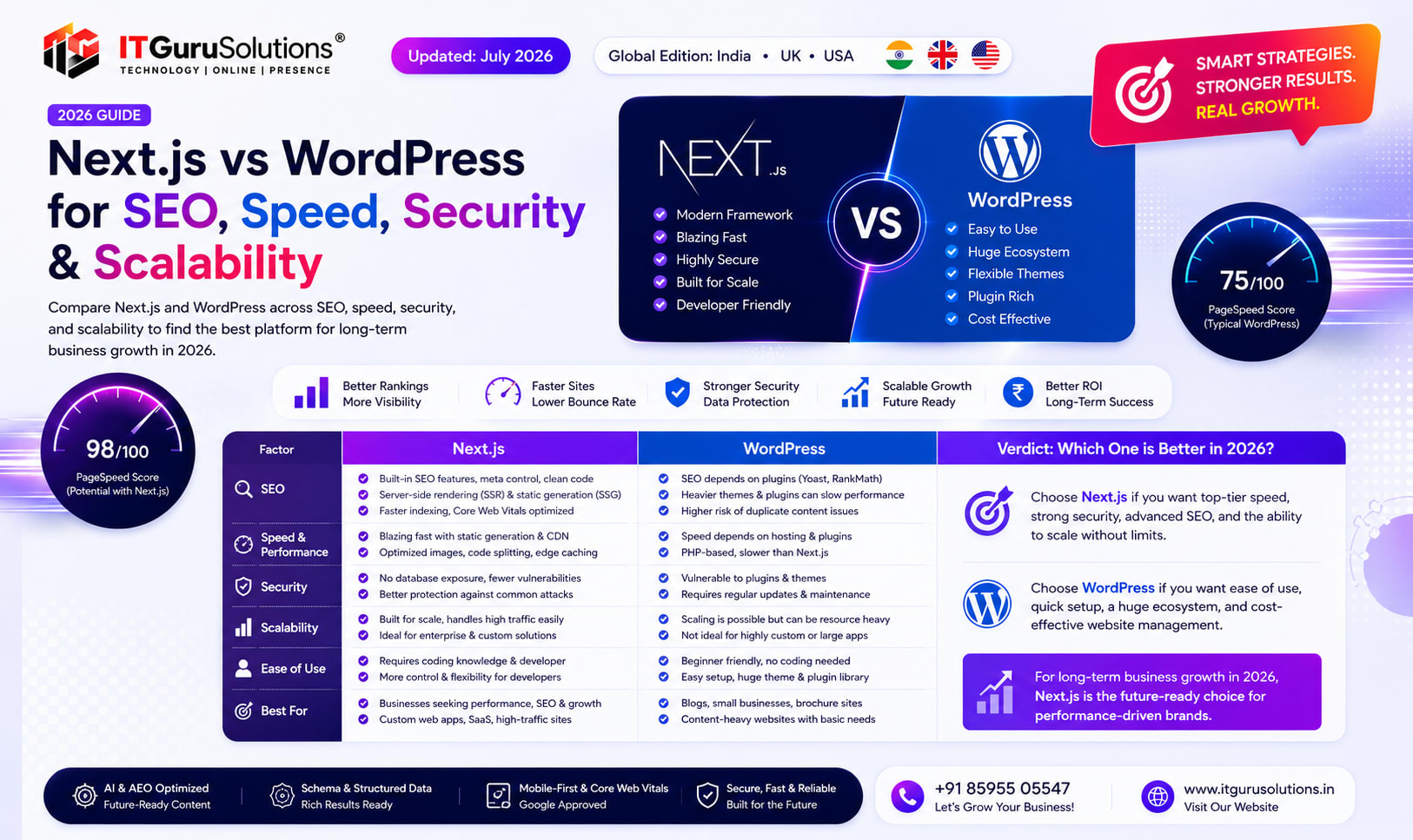
Next.js outperforms WordPress in core web vitals, server side rendering speed, and SEO control, while WordPress offers faster initial setup and a larger plugin ecosystem. Choose Next.js for performance critical, custom web applications and WordPress for content heavy sites that need rapid deployment without developer resources.
Quick Answer: If your business website is becoming slower, harder to maintain, or struggling to meet Google's Core Web Vitals, migrating from WordPress to Next.js may be worth considering. Next.js offers modern rendering methods, improved performance, stronger technical SEO capabilities, and greater flexibility for businesses planning long-term digital growth. The right platform ultimately depends on your content strategy, business goals, and technical requirements.
Your website is often the first impression customers have of your business. In competitive markets like Delhi, Noida, Gurugram, Ghaziabad, and Faridabad, a slow or outdated website can affect user experience, search visibility, and lead generation. Businesses today are increasingly looking beyond traditional CMS platforms toward modern frameworks that support faster performance and better scalability.
At IT Guru Solutions, we've seen a growing interest from businesses that want websites built for speed, search visibility, and future scalability—not just attractive designs. Whether you're planning a new project or evaluating a WordPress to Next.js migration, understanding the strengths of each platform helps you make an informed decision rather than following industry trends.
This guide explains the practical differences between WordPress and Next.js from a business perspective. Instead of focusing only on technology, we'll explore how each platform affects website performance, SEO, security, maintenance, and long-term growth.
Why This Comparison Matters in 2026
Google's search ecosystem continues to evolve alongside AI-powered search experiences, Core Web Vitals, and user experience signals. Modern websites are expected to load quickly, work seamlessly across devices, and provide structured content that search engines can easily understand.
While WordPress remains one of the world's most widely used content management systems, many businesses eventually encounter challenges as their websites grow. These can include increasing plugin dependencies, slower loading pages, more frequent maintenance, and limited flexibility for advanced web applications.
Next.js approaches website development differently. Built on React, it allows developers to use rendering strategies such as Static Site Generation (SSG), Server-Side Rendering (SSR), and Incremental Static Regeneration (ISR). These techniques can improve performance and give development teams greater control over how content is delivered to both users and search engines.
Who Should Read This Guide?
- Business owners planning a website redesign
- Companies considering a WordPress to Next.js migration
- Marketing teams focused on improving SEO performance
- Startups building scalable digital products
- eCommerce businesses seeking faster page experiences
- Organizations evaluating custom website development in Delhi NCR
WordPress vs. Next.js: Understanding the Difference
Although they're often compared, WordPress and Next.js serve different purposes.
WordPress is primarily a content management system (CMS). It enables businesses to publish and manage content through an administrative dashboard and can be extended using themes and plugins.
Next.js, on the other hand, is a React framework used to build modern web applications and high-performance websites. Rather than relying on numerous plugins, developers create custom solutions tailored to specific business requirements.
Neither platform is universally "better." The right choice depends on factors such as website complexity, expected traffic, content workflow, security requirements, integration needs, and future scalability.
Common Challenges Businesses Face with Growing WordPress Websites
Many WordPress websites perform exceptionally well when properly maintained. However, businesses often begin exploring custom development as their digital requirements become more complex.
Some common operational challenges include:
- Managing multiple third-party plugins
- Plugin compatibility after updates
- Slower database-driven page generation on larger websites
- Performance variations caused by heavy themes
- Additional maintenance required for security updates
- Difficulty achieving consistent Core Web Vitals scores across all pages
- Custom functionality becoming increasingly difficult to manage
These issues don't affect every WordPress website, but they are common considerations for organizations experiencing rapid digital growth.
Keyword Cluster Covered in This Guide
This article answers common questions related to:
- Next.js web development company Delhi NCR
- WordPress to Next.js migration
- Custom website development Delhi NCR
- SEO-friendly website architecture
- Core Web Vitals optimization
- Technical SEO for React websites
- Server-side rendering (SSR)
- Static Site Generation (SSG)
- Incremental Static Regeneration (ISR)
- Headless CMS architecture
- Website performance optimization
- Modern web development frameworks
What You'll Learn Next
In the next section, we'll compare Next.js and WordPress using practical performance metrics, discuss Core Web Vitals, review SEO architecture, and explain why many businesses investing in custom website development are evaluating modern frameworks for long-term growth.
Performance Comparison: Next.js vs. WordPress for Modern Business Websites
Website speed is no longer just a technical metric—it directly influences how visitors interact with your business online. People expect pages to load quickly, forms to respond instantly, and navigation to feel smooth across desktops and mobile devices. Even small delays can reduce engagement and increase abandonment, particularly for businesses competing in local markets such as Delhi NCR.
While both WordPress and Next.js can deliver fast websites when implemented well, they achieve this in different ways. WordPress generally relies on themes, plugins, caching solutions, and hosting optimizations. Next.js, by contrast, is built with modern rendering techniques that give developers greater control over performance from the start.
Next.js vs. WordPress: Performance Overview
| Feature | WordPress | Next.js |
|---|---|---|
| Rendering Method | Dynamic PHP Rendering | Static Generation (SSG), Server-Side Rendering (SSR), ISR |
| Page Loading | Depends on hosting, theme and plugins | Optimized through modern rendering strategies |
| Image Optimization | Usually requires plugins | Built-in image optimization |
| Caching | External caching configuration | Framework-level caching support |
| Developer Flexibility | Theme and plugin ecosystem | Fully customizable React architecture |
| Scalability | Can require additional optimization as complexity grows | Well suited for complex, scalable applications |
Understanding Core Web Vitals
Google's Core Web Vitals measure how users experience a webpage. Rather than focusing only on loading speed, these metrics evaluate responsiveness and visual stability. Improving them helps create a smoother browsing experience and supports overall website quality.
| Metric | Measures | Recommended Goal |
|---|---|---|
| Largest Contentful Paint (LCP) | Main content loading speed | Less than 2.5 seconds |
| Interaction to Next Paint (INP) | Responsiveness to user interactions | Less than 200 ms |
| Cumulative Layout Shift (CLS) | Visual stability while loading | Below 0.1 |
Meeting these recommendations depends on multiple factors, including hosting, code quality, image optimization, third-party scripts, and overall website architecture—not solely on the framework being used.
How Next.js Improves Technical SEO
Technical SEO begins with a website that search engines can efficiently crawl, render, and understand. Next.js supports several rendering strategies that can make content readily available to search engines while maintaining fast user experiences.
Server-Side Rendering (SSR)
SSR generates HTML on the server before sending it to the browser. This can help search engines access page content immediately, particularly for dynamic pages that change frequently.
Static Site Generation (SSG)
SSG creates HTML during the build process, allowing pages to be served quickly through content delivery networks (CDNs). This approach is often effective for landing pages, service pages, and blogs that don't require constant real-time updates.
Incremental Static Regeneration (ISR)
ISR combines the speed of static pages with the flexibility to update content without rebuilding the entire website. It allows selected pages to regenerate automatically after a defined interval.
Together, these rendering methods help developers build websites that balance performance, scalability, and maintainability.
Structured Data and Search Visibility
Modern search results increasingly rely on structured data to understand page content. Whether a website is built with WordPress or Next.js, implementing valid Schema.org markup can improve how search engines interpret information about articles, services, FAQs, organizations, and other entities.
Next.js provides developers with flexibility to generate structured data directly within components, making it easier to manage JSON-LD consistently across large websites.
Security Considerations
Security should be considered during every stage of website development. WordPress benefits from a mature ecosystem and regular updates, but websites using numerous third-party plugins require ongoing monitoring to ensure compatibility and security.
Custom Next.js applications generally have fewer dependencies on plugins because functionality is developed directly into the application. This often provides development teams with greater control over maintenance, although secure coding practices, infrastructure management, authentication, and regular updates remain essential regardless of the technology stack.
Is WordPress to Next.js Migration Right for Every Business?
Not necessarily.
For content-focused websites with relatively simple functionality, a well-optimized WordPress installation may continue to meet business requirements effectively.
However, organizations planning custom web applications, complex integrations, multilingual platforms, enterprise portals, or performance-focused digital experiences often evaluate Next.js because it offers greater architectural flexibility.
The decision should be based on business objectives, technical requirements, available resources, and long-term growth plans rather than technology trends alone.
Planning a Migration Strategy
A successful migration involves more than rebuilding pages. It typically includes content auditing, URL mapping, SEO preservation, structured data validation, performance testing, analytics migration, redirects, and user acceptance testing.
Working with an experienced development team helps reduce disruption while preserving existing search visibility and improving the overall user experience. If you're evaluating custom website development services, it's worth discussing your existing website architecture before deciding whether migration is the right approach.
An Example Migration Scenario: What Businesses in Delhi NCR Often Aim to Improve
Many businesses begin considering a modern web architecture when their existing website no longer supports their marketing or operational goals. Common concerns include slower page loads, increasing maintenance, inconsistent Core Web Vitals, and difficulty adding new functionality without affecting overall performance.
Consider the following illustrative example based on a typical service-based business in Delhi NCR. This example is provided to explain the migration process and should not be interpreted as a guaranteed outcome.
| Area | Before Migration | After Modern Rebuild |
|---|---|---|
| Website Platform | Traditional WordPress | Next.js with modern architecture |
| Performance Strategy | Plugin-based optimization | Built-in rendering optimization |
| Maintenance | Frequent plugin updates | Centralized development workflow |
| Scalability | Growing complexity | Designed for future expansion |
| SEO Management | Plugin dependent | Custom technical SEO implementation |
Every migration is different. The improvements a business experiences depend on its existing website, hosting environment, development quality, content structure, and ongoing optimization efforts.
Should You Stay with WordPress or Move to Next.js?
There isn't a universal answer because both platforms serve different business needs.
WordPress May Be the Right Choice If You:
- Publish content regularly through a traditional CMS.
- Operate a relatively simple business website.
- Need an easy-to-manage editorial workflow.
- Rely on standard plugins rather than custom functionality.
- Have limited development requirements.
Next.js May Be Worth Considering If You:
- Need a highly customized website or web application.
- Want greater flexibility for performance optimization.
- Plan to integrate multiple APIs or enterprise systems.
- Require advanced SEO architecture.
- Expect your digital platform to scale significantly over time.
- Prioritize modern development practices and long-term maintainability.
Best Practices Before Migrating from WordPress
A successful migration begins with planning rather than development. Businesses that invest time in technical discovery often avoid unnecessary delays and SEO issues during launch.
- Review existing URLs and create a redirect strategy.
- Audit your content before migration.
- Preserve metadata and structured data where appropriate.
- Benchmark current Core Web Vitals.
- Optimize images and media assets.
- Test the new website before launch.
- Monitor search performance after deployment.
- Update XML sitemaps and Search Console settings.
Frequently Asked Questions
Is Next.js better than WordPress for SEO?
Both platforms can support strong SEO when implemented correctly. Next.js gives developers greater flexibility over rendering, structured data, performance optimization, and technical architecture, while WordPress offers mature SEO capabilities through plugins and careful configuration.
Can I migrate my existing WordPress website without losing SEO?
Yes. With proper planning—including URL mapping, redirects, metadata preservation, and technical testing—it is possible to migrate while maintaining search visibility. Every migration should be approached carefully to minimize disruption.
Does every business need Next.js?
No. Many organizations continue to succeed with WordPress. The right choice depends on your business objectives, technical requirements, growth plans, and available resources.
How long does a website migration usually take?
The timeline varies depending on website size, custom functionality, integrations, content volume, and testing requirements. Small projects may take a few weeks, while larger enterprise migrations typically require more planning.
Is custom website development more expensive than WordPress?
Custom development generally involves a higher initial investment because the website is built around specific business requirements. However, long-term value depends on factors such as scalability, maintenance, performance goals, and future development needs.
Key Takeaways
- Choose technology based on business goals rather than trends.
- Website performance is influenced by architecture, hosting, optimization, and development quality.
- Technical SEO should be part of the development process from the beginning.
- Modern frameworks offer greater flexibility for custom digital experiences.
- A carefully planned migration helps reduce technical and SEO risks.
Final Thoughts
Selecting the right website platform is a strategic business decision, not simply a technology choice. WordPress continues to be an excellent solution for many organizations, while Next.js offers additional flexibility for businesses building high-performance, scalable digital platforms.
If your current website is becoming difficult to maintain, no longer meets performance expectations, or needs functionality beyond the capabilities of a standard CMS, it may be worthwhile to evaluate whether a modern development approach aligns with your long-term objectives.
Every project should begin with a technical assessment, a review of business goals, and a clear understanding of user requirements before deciding on the most suitable platform.
Ready to Discuss Your Website Strategy?
Whether you're planning a new website or evaluating a migration from WordPress, the right approach starts with understanding your business objectives, technical requirements, and long-term growth plans.
Schedule a consultation with our team to discuss your project, review your existing website architecture, and explore solutions tailored to your business needs.
Key Takeaways
- Why This Comparison Matters in 2026
- Who Should Read This Guide
- WordPress vs. Next.js: Understanding the Difference
- Common Challenges Businesses Face with Growing WordPress Websites
About Rajesh Kumar
Expert at IT Guru Solutions
Read Next
Best Website Development Services in Noida 2026 | Top Web Development Company
Professional Website Development Services in Noida helping businesses build responsive, SEO-friendly, conversion-focused websites for growth.
Best Website Development Services in India 2026
Professional website development services in India helping businesses improve visibility, user experience, lead generation, and long-term digital growth.
Best Web Development Companies in India 2026 | Top Website Developers
Find the best Website Development Companies in India for SEO-friendly, AI-ready, fast-loading, and scalable web development solutions.
Continue Reading
View allPrevious
Best Logo Design Company in India 2026 | Professional Logo Design Services | IT Guru Solutions
Looking for the best logo design company in India? Learn how professional logo design strengthens branding, builds trust, and supports long-term business growth
Next
The Complete Guide to Voice Search SEO, AI Search, AEO & GEO Voice Search Optimization in 2026
Complete Voice Search Optimization guide covering Voice Search SEO, AI Search, AEO, GEO, Entity SEO, Local SEO, and conversational search.
Ready to implement these strategies?
Our team at IT Guru Solutions can help you achieve your goals with expert guidance.